
MSI Cyborg 17 B2RWFKG-074US RAM and SSD Upgrade Guide
Compatible memory and storage upgrades, supported capacities, part numbers, and what to check before opening your laptop.
By leshcatlabs.net · Published
The MSI Cyborg 17 B2RWFKG-074US comes with an Intel Core 7 240H processor, NVIDIA GeForce RTX 5060 Laptop GPU, 16GB DDR5-5600 memory, and a 1TB PCIe Gen4 NVMe SSD. If you need more memory for multitasking or additional space for games and applications, both RAM and internal storage have documented upgrade options.
Kingston's compatibility catalog identifies replacement memory configurations up to 96GB and NVMe SSDs up to 4TB for the B2RWFKG model family. The important distinction is that these are manufacturer-listed compatible parts, not a claim that every part has been independently installed and tested in the exact B2RWFKG-074US retail configuration.
This guide focuses on the upgrades with manufacturer-supported compatibility information, their practical benefits, and the precautions you should take before ordering or installing anything.
Kingston lists DDR5-5600 memory configurations up to 96GB using two matched 48GB SO-DIMM modules.
Compatible M.2 2280 NVMe SSDs include Kingston NV3 drives with capacities up to 4TB.
The CPU and GPU have no verified user upgrade path, making memory and storage the practical improvements.
MSI Cyborg 17 B2RWFKG-074US Specifications and Upgrade Options
| Component | Factory Configuration | Upgrade Information |
| Processor | Intel Core 7 240H | No manufacturer-supported processor upgrade identified |
| Graphics | NVIDIA GeForce RTX 5060 Laptop GPU, 8GB GDDR7 | No manufacturer-supported GPU upgrade identified |
| Memory | 16GB DDR5-5600, 2 x 8GB | Kingston lists configurations up to 96GB |
| Memory Slots | 2 occupied SO-DIMM slots | Replace the existing modules for a matched pair |
| Storage | 1TB PCIe Gen4 x4 NVMe SSD | Kingston lists compatible M.2 2280 SSDs up to 4TB |
| Wireless | Intel Wi-Fi 6E AX211 | No verified wireless upgrade part |
| Display | 17.3-inch FHD 1920 x 1080, 144Hz | No verified panel upgrade |
| Battery | 4-cell 55.2Wh Li-polymer | Exact replacement SKU not verified |
| Power | 120W external adapter | No higher-wattage upgrade verified |
Upgrading the MSI Cyborg 17 B2RWFKG-074US RAM
The factory configuration has 16GB DDR5-5600 memory, installed as two 8GB SO-DIMM modules. With both slots occupied, upgrading to 32GB, 64GB, or 96GB requires replacing the original modules.
Kingston lists compatible DDR5-5600 memory for the B2RWFKG family, with configurations up to 96GB using two 48GB modules. Kingston also specifies installing memory in pairs for dual-channel operation.
For most gaming and everyday workloads, 32GB is a sensible target. If you regularly run virtual machines, memory-heavy creative software, or several development environments, 64GB may be more useful. The maximum 96GB configuration is better reserved for workloads that actually need that much memory.
MSI Cyborg 17 Memory Upgrade Requirements
| Specification | Requirement |
|---|---|
| Memory Type | DDR5, non-ECC, unbuffered |
| Form Factor | 262-pin SO-DIMM |
| Listed Memory Speed | 5600 MT/s |
| Voltage | 1.1V |
| Memory Slots | 2 |
| Factory Memory | 2 x 8GB |
| Maximum Listed Configuration | 2 x 48GB, 96GB total |
| Installation | Matched pairs recommended by Kingston |
Kingston Memory Listed for MSI Cyborg 17 B2RWFKG
| Part Number | Description | Configuration |
|---|---|---|
| KVR56S46BS8-16 | Kingston 16GB DDR5-5600 CL46 SO-DIMM, 1Rx8 | 2 modules for 32GB |
| KVR56S46BS8-32 | Kingston 32GB DDR5-5600 CL46 SO-DIMM, 1Rx8 | 2 modules for 64GB |
| KVR56S46BD8-32 | Kingston 32GB DDR5-5600 CL46 SO-DIMM, 2Rx8 | 2 modules for 64GB |
| KVR56S46BD8-48 | Kingston 48GB DDR5-5600 CL46 SO-DIMM, 2Rx8 | 2 modules for 96GB |
Which Memory Upgrade Makes the Most Sense?
For a typical Cyborg 17 owner, I'd start with 32GB using two 16GB modules. It's a meaningful increase over the factory 16GB and gives Windows and demanding applications more room to work.
A 64GB configuration makes more sense if you regularly use memory-intensive software. Kingston lists both single-rank and dual-rank 32GB modules for this model family. Rather than mixing these variants, I'd use two matching modules of the same part number.
Kingston also lists 48GB modules for a 96GB configuration. That's useful for specialized applications, but it won't automatically make ordinary games run faster. Memory capacity helps most when your current workload is running short of RAM.
leshcatlabs.net participates in the Amazon Services LLC Associates Program, an affiliate advertising program designed to provide a means for sites to earn advertising fees by linking to Amazon.com
Best Everyday RAM Upgrade
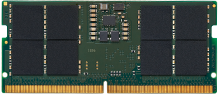
Here is why I recommend this...
I'd pick two of these for someone who wants more breathing room without spending money on unnecessary capacity. It's the most practical starting point for a typical 16GB laptop.
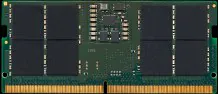
A Kingston ValueRAM 16GB DDR5-5600 CL46 non-ECC SO-DIMM listed for the Cyborg 17 B2RWFKG family. Install two matching modules to reach 32GB and replace both factory 8GB modules.
Compare Kingston 16GB DDR5-5600 Memory Prices
| Merchant | Price | Shipping | Availability | |
|---|---|---|---|---|
| Boost Hardware | See Site | Free | — | Visit Site |
Best for Heavy Multitasking
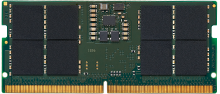
Here is why I recommend this...
I'd consider 64GB for someone using several virtual machines or large creative projects. It's a better fit for demanding productivity workloads than for ordinary gaming alone.
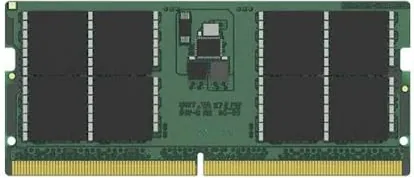
A Kingston 32GB DDR5-5600 CL46 non-ECC SO-DIMM using a 1Rx8 organization. Two matching modules provide 64GB total memory and are listed for the Cyborg 17 B2RWFKG family.
Maximum Listed RAM Capacity
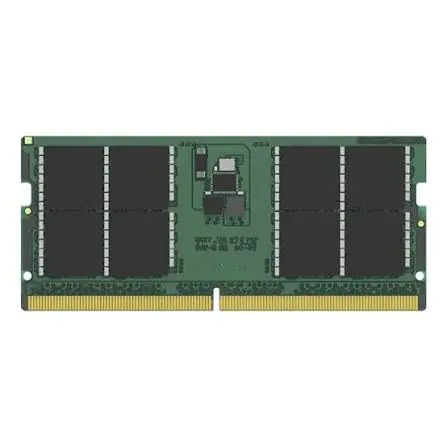
Here is why I recommend this...
I'd only choose 96GB if your software can use it. For a serious virtualization or development workload, that extra headroom might be worth the expense.
This Kingston 48GB DDR5-5600 CL46 module uses a dual-rank organization. Kingston lists two matching modules as a way to reach the 96GB maximum for the Cyborg 17 B2RWFKG family.
Compare Recommended Memory Configurations
KVR56S46BS8-16
|
KVR56S46BS8-32
|
KVR56S46BD8-48
|
|
|---|---|---|---|
| Capacity per Module | 16GB | 32GB | 48GB |
| Capacity with Two Modules | 32GB | 64GB | 96GB |
| Speed | DDR5-5600 | DDR5-5600 | DDR5-5600 |
| Organization | 1Rx8 | 1Rx8 | 2Rx8 |
| Best Use | Gaming and multitasking | Memory-heavy applications | Maximum-capacity workloads |
Upgrading the MSI Cyborg 17 B2RWFKG-074US SSD
The laptop ships with a 1TB PCIe Gen4 x4 NVMe SSD. Kingston's compatibility catalog identifies M.2 2280 single-sided NVMe storage for the B2RWFKG family and lists replacement drives through 4TB.
The Kingston NV3 is a straightforward option because it uses the same PCIe Gen4 generation as the laptop's factory storage interface. Kingston also lists FURY Renegade G5 PCIe Gen5 drives, but the laptop cannot provide full Gen5 interface speeds.
Before planning the upgrade, confirm your exact storage layout and installation procedure using MSI documentation. The manufacturer's specifications establish the factory SSD, while Kingston establishes the listed replacement drive compatibility. Neither source establishes a second usable internal SSD slot for this exact retail configuration.
Cyborg 17 SSD Upgrade Specifications
| Specification | Details |
| Factory SSD | 1TB NVMe PCIe Gen4 x4 |
| Replacement Form Factor | M.2 2280 |
| Replacement Interface | PCIe NVMe |
| Compatibility Catalog Form Factor | Single-sided |
| Largest Kingston-Listed SSD | 4TB |
| PCIe Gen5 Operation | Limited by the laptop's Gen4 interface |
| Additional SSD Slot | Not independently established for this exact retail SKU |
Kingston NVMe SSDs Listed for MSI Cyborg 17 B2RWFKG
| Part Number | Description | Notes |
| SNV3S/500G | Kingston NV3 500GB PCIe 4.0 NVMe M.2 2280 SSD | Lower capacity than factory SSD |
| SNV3S/1000G | Kingston NV3 1TB PCIe 4.0 NVMe M.2 2280 SSD | Factory-capacity replacement |
| SNV3S/2000G | Kingston NV3 2TB PCIe 4.0 NVMe M.2 2280 SSD | Recommended capacity upgrade |
| SNV3S/4000G | Kingston NV3 4TB PCIe 4.0 NVMe M.2 2280 SSD | High-capacity replacement |
| SFYR2S/1T0 | Kingston FURY Renegade G5 1TB PCIe 5.0 NVMe SSD | Gen5 drive limited to Gen4 interface speed |
| SFYR2S/2T0 | Kingston FURY Renegade G5 2TB PCIe 5.0 NVMe SSD | Gen5 drive limited to Gen4 interface speed |
| SFYR2S/4T0 | Kingston FURY Renegade G5 4TB PCIe 5.0 NVMe SSD | Gen5 drive limited to Gen4 interface speed |
2TB or 4TB: Which SSD Should You Buy?
I'd consider 2TB the starting point if you're replacing the original 1TB drive because you're running low on space. It provides a worthwhile capacity increase without automatically moving to the largest drive available.
A 4TB SSD makes sense if you keep a large collection of installed games, work with substantial local media files, or want to avoid another storage replacement. Kingston lists the NV3 4TB model for this laptop family.
The FURY Renegade G5 is also listed as compatible, but its PCIe Gen5 performance is not a compelling reason to buy it for a Gen4 laptop. Price, power consumption, and thermal behavior deserve consideration before choosing a higher-performance drive.
Best Everyday SSD Upgrade
Kingston SNV3S/2000G NV3 2TB PCIe 4.0 NVMe M.2 2280 SSD
Here is why I recommend this...
This would be my first choice for someone who primarily needs more space. It matches the laptop's PCIe generation, and 2TB is a practical capacity for games and general applications.
The Kingston NV3 2TB uses the PCIe 4.0 NVMe interface and M.2 2280 form factor listed for the Cyborg 17 family. Replacing the factory 1TB SSD with this model doubles the nominal storage capacity.
Compare Kingston NV3 2TB Prices
| Merchant | Price | Shipping | Availability | |
|---|---|---|---|---|
| Boost Hardware | See Site | Free | — | Visit Site |
Best High Capacity SSD
Kingston SNV3S/4000G NV3 4TB PCIe 4.0 NVMe M.2 2280 SSD
Here is why I recommend this...
I'd choose 4TB for someone with a large game library or substantial local project files. If you already know 2TB won't be enough, buying sufficient capacity now avoids another replacement later.
Kingston lists this 4TB PCIe Gen4 NVMe SSD for the B2RWFKG family. It provides four times the nominal capacity of the factory drive, with physical installation following the laptop's M.2 service requirements.
Compare Kingston NV3 4TB Prices
| Merchant | Price | Shipping | Availability | |
|---|---|---|---|---|
| eBay | $499.00 | -- | — | Visit Site |
| Boost Hardware | See Site | Free | — | Visit Site |
Compare Kingston SSD Upgrade Options
|
SNV3S/2000G
|
SNV3S/4000G
|
SFYR2S/2T0
|
|
|---|---|---|---|
| Capacity | 2TB | 4TB | 2TB |
| SSD Interface | PCIe Gen4 NVMe | PCIe Gen4 NVMe | PCIe Gen5 NVMe |
| Laptop Interface | PCIe Gen4 | PCIe Gen4 | PCIe Gen4 |
| Form Factor | M.2 2280 | M.2 2280 | M.2 2280 |
| Best Use | Everyday storage upgrade | High-capacity storage | Alternative with Gen5 capability for another system |
Before You Upgrade the MSI Cyborg 17
Make sure your laptop is the B2RWFKG-074US rather than a different Cyborg generation or configuration. MSI uses similar names across multiple laptop families, and upgrade specifications can differ.
Memory Installation
- Use DDR5 SO-DIMM modules rather than desktop DIMMs.
- Replace both factory 8GB modules when installing a larger matched pair.
- Use the same part number for both modules where practical.
- Check the installed BIOS version and MSI's support information, particularly for maximum-capacity configurations.
- Remember that actual memory operating speed can depend on the processor and installed configuration.
SSD Installation
- Back up important data before replacing the SSD.
- Decide whether to clone Windows or perform a clean installation.
- Save your BitLocker recovery key if device encryption is enabled.
- Choose an M.2 2280 drive with the appropriate physical clearance.
- Avoid assuming an SSD with a large preinstalled heatsink will fit.
- Check MSI's service instructions before removing the bottom cover or disconnecting internal components.
Service and Warranty
Turn the laptop off, disconnect external power, and follow MSI's safety guidance before accessing internal components. MSI recommends consulting an authorized service center for SSD upgrades. Check the applicable service and warranty conditions before proceeding.
Can You Upgrade the Processor or Graphics Card?
There is no manufacturer-supported CPU or GPU upgrade path established for the Cyborg 17 B2RWFKG-074US. Its Intel Core 7 240H processor and NVIDIA GeForce RTX 5060 Laptop GPU should be treated as part of the fixed laptop platform rather than replaceable upgrade modules.
The laptop also includes Intel Wi-Fi 6E AX211 wireless connectivity, a 55.2Wh battery, and a 120W power adapter. Exact compatible upgrade part numbers for those components were not verified, so this guide does not recommend substitutes.
Replacing a failed component with an authorized service part is different from upgrading it. For those repairs, use the exact MSI model and serial number when requesting service-part identification.
Which MSI Cyborg 17 Upgrade Is Worth the Money?
For most owners, I'd start by looking at current memory usage and available SSD space. If you're regularly close to the factory 16GB memory limit, moving to 32GB DDR5 is a reasonable first upgrade. If you're constantly deleting games or moving files to make room, a 2TB Kingston NV3 SSD is likely more useful.
There are also supported options for 64GB or 96GB memory and 4TB storage, but capacity alone doesn't guarantee better performance. Buy what your applications actually need.
For exact factory specifications, see MSI's official B2RWFKG-074US specification sheet. For manufacturer-listed memory and SSD compatibility, use Kingston's Cyborg 17 compatibility catalog, which explicitly includes the B2RWFKG family.
What is the maximum RAM for the MSI Cyborg 17 B2RWFKG-074US?
Kingston lists configurations up to 96GB using two compatible 48GB DDR5-5600 SO-DIMM modules for the B2RWFKG family.
Can I upgrade the Cyborg 17 from 16GB to 32GB RAM?
Yes. The factory 16GB configuration has two 8GB modules. Replace them with two compatible 16GB DDR5 SO-DIMMs, such as Kingston KVR56S46BS8-16.
Does the MSI Cyborg 17 support 64GB of RAM?
Kingston lists compatible 32GB DDR5-5600 modules for this laptop family. Installing two matching 32GB modules provides 64GB total memory.
Can I install a 4TB SSD in the MSI Cyborg 17?
Kingston lists the 4TB NV3 SNV3S/4000G among its compatible SSDs for the B2RWFKG family. That is a manufacturer compatibility listing, not independent installation testing of the exact retail SKU.
Will a PCIe Gen5 SSD work in the MSI Cyborg 17?
Kingston lists certain FURY Renegade G5 PCIe Gen5 SSDs for this laptop family. The laptop's PCIe Gen4 storage interface limits their operating interface speed.
Can I upgrade the RTX 5060 graphics card?
No manufacturer-supported replacement graphics upgrade was verified. The RTX 5060 Laptop GPU should be treated as part of the fixed laptop configuration.
Do I need to reinstall Windows after an SSD upgrade?
You can either clone the existing Windows installation to the replacement SSD or perform a clean installation. Back up your files and save any BitLocker recovery key before replacing the drive.